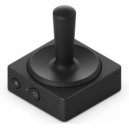
Connect Microsoft Adaptive Joystick Button to Microsoft
Adaptive Hub (sold separately). This innovative wireless
button has eight digital inputs and an easy-to-press design.
You can create sequence macros with the button to simplify
complex tasks on a PC or phone-or 3D print your own button
topper through Shapeways to fit your needs.
Create custom inputs without a keyboard
Replace or augment traditional keyboards with the adaptable
wireless buttons and wired switches that put you in control,
allowing you to easily create your own custom inputs.
Composed of a central adaptive hub that can pair with up to
four wireless buttons and standard wired connections to let
you design the setup that works best for you.
Augment traditional keyboards
Increase your productivity through a hub and wireless
buttons that let you create custom inputs to simplify
complex tasks on a PC or phone.
One button, multiple actions
Innovative, wireless button with eight digital inputs that
allow you to use your favorite apps more effectively.
Customize your experience with different buttons and toppers
Choose between a d-pad, joystick, or dual button.
Personalize button toppers further with 3D printing through
Shapeways.
Build the hardware setup that works for you
Wireless, expandable design connects up to four first-party
Microsoft buttons, third-party accessories, and assistive
tech switches via five 3.5mm ports.
Accessible by design
A fully customizable experience, Microsoft adaptive
accessories empower you to fit your needs. Unlock your
potential, remove barriers, and increase productivity with
the easy-to-use system that adapts and grows with you.
 Award One Technology
Pty Ltd