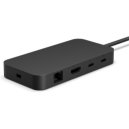
Surface USB4 Dock is a full stationary docking solution, with a
compact, sleek design that keeps your desktop organized. The Surface
USB4 Dock enables you to connect and power devices and accessories
with 65-watt power delivery, ensuring peak performance throughout
the workday.
-
Ultra-fast connectivity: Get 40-Gbps data transfer via
USB4, four times faster than USB 3.2.
-
Power delivery: Includes a 100-W power supply
delivering 65-W passthrough charging for laptops and accessory
charging.
-
Dual screen support: Supports up to two 4K monitors
with HDMI or USB-C output, enhancing multitasking. Plus, single
8K monitor support at 30 HZ via USB-C.
-
Reliable Ethernet connectivity: Supports Gigabit
Ethernet, ensuring fast and reliable network connections.
-
Core commercial manageability features: Equipped with
essential capabilities such as PXE boot,1 WMI,
and Media Access Control (MAC) address passthrough2 for
streamlined IT operations.
-
Universal compatibility: Designed to work with Surface
devices3 and
compatible with numerous USB-C, USB4, and Thunderbolt 4 devices.
-
Compact and lightweight: At 206 grams (7.2 ounces),
USB4 Dock includes tactile indicators for easier port
wayfinding.
-
Designed with sustainability in mind: Contains
more recycled materials than any previous Surface Dock,
including 100% recycled tin, 100% recycled gold, and 50%
recycled plastics.4

Surface USB4 Dock comes with the following management and security
features:
-
Firmware updates through Windows Update: Keep your dock
up to date with automatic updates or downloadable driver and
firmware packs.
-
MAC address passthrough: Maintain consistent network
identity across different docks for easy management in shared
workspaces.2
-
Wake-on-LAN (WOL)5 from
Modern Standby: IT admins can remotely wake devices
connected to Surface USB4 Dock and automate management tasks.
-
Surface USB4 Dock doesn't support WOL with device-targeted
MAC address passthrough.
-
Alternative WOL pathways include using connected standby
(Modern Standby) instead of WOL from S4/S5, or configuring
the dock for MAC address passthrough rather than the device
MAC address.
-
PXE Boot: IT admins can deploy operating
systems, troubleshoot, and manage large numbers of devices in a
network.1
-
Windows Management Instrumentation (WMI): IT admins can
remotely monitor and manage the latest firmware, policy
settings, and related data across Surface USB4 Dock and other
Surface docks. For details, see Manage
Surface Dock with WMI.
-
Centralized support and warranty service: IT admins can
access direct support from the Surface
Management Portal or Surface
Support Portal.
Surface USB4 Dock is optimized for numerous USB-C/USB4/Thunderbolt
4-enabled devices,3 including
the following Surface devices:
-
Surface Laptop 7th Edition, Intel processor
-
Surface Pro 11th Edition, Intel processor
-
Surface Laptop 7th Edition, Snapdragon processor
-
Surface Pro 11th Edition, Snapdragon processor
-
Surface Pro 10
-
Surface Laptop 6
-
Surface Pro 9 (Intel/Wi-Fi)
-
Surface Pro 8
Surface USB4 Dock is compatible with the following Surface for
Business devices with USB-C3 ports:
-
Surface Laptop, 13-inch
-
Surface Pro, 12-inch
-
Surface Pro 7 and later
-
Surface Pro X (all generations)
-
Surface Laptop 3 and later
-
Surface Laptop Studio (all generations)
-
Surface Laptop Go (all generations)
-
Surface Laptop SE
-
Surface Go (all generations)
-
Surface Book 2 and later
 Award One Technology
Pty Ltd